The Problem We Are Solving
Swansea town meetings run efficiently on most articles — a voice vote takes seconds and the moderator can call the result. But when a vote is close, the process breaks down. A ballot vote is called, paper is distributed, collected, and hand-counted. Each contested article adds up to 20 minutes of dead time to the meeting.
The longer a meeting runs, the fewer registered voters are present when later articles come to a vote. Residents who came in good faith to participate leave before the meeting ends — not because they lost interest, but because the process takes too long. This undermines the legitimacy of outcomes on late-agenda articles.
The Town already has a fast, effective voting method for clear outcomes: the voice vote. The goal of this proposal is not to replace that — it is to replace only the slow paper ballot process with an electronic equivalent that delivers results in under two minutes instead of twenty.
How the System Works
The Swansea Meeting Vote system is a web-based electronic voting platform built specifically for New England open town meetings. Voters use their own smartphones — no hardware to rent, no clickers to distribute, no batteries to charge.
The meeting night flow
as normal
to call
electronic vote
< 2 minutes
Voice votes continue exactly as they always have. The electronic system only activates when the moderator decides a ballot vote is warranted. At that point, instead of distributing paper, the moderator opens a vote on the control panel — and every attendee who checked in with a voter pass can vote immediately from their phone.
What attendees do
- At the door, a volunteer confirms the voter's name on the roll and hands them a printed Voter Pass — a card with a QR code unique to them
- The voter scans the QR code with their phone camera once to activate their pass — no app download required
- When a vote opens, their phone displays the article text and YES / NO / ABSTAIN buttons
- They tap their choice — the vote is recorded instantly and the pass is locked so it cannot vote again
What the moderator sees
- A control panel on a tablet or laptop at the podium shows every article, its current status, and live tally as votes come in
- The moderator clicks Open Vote to start and Close Vote when satisfied — the final tally is displayed immediately
- A display screen can be projected on the auditorium screen so the entire room sees the result in real time
- The Official Report is generated automatically at the end — no hand-tallying, no recount requests
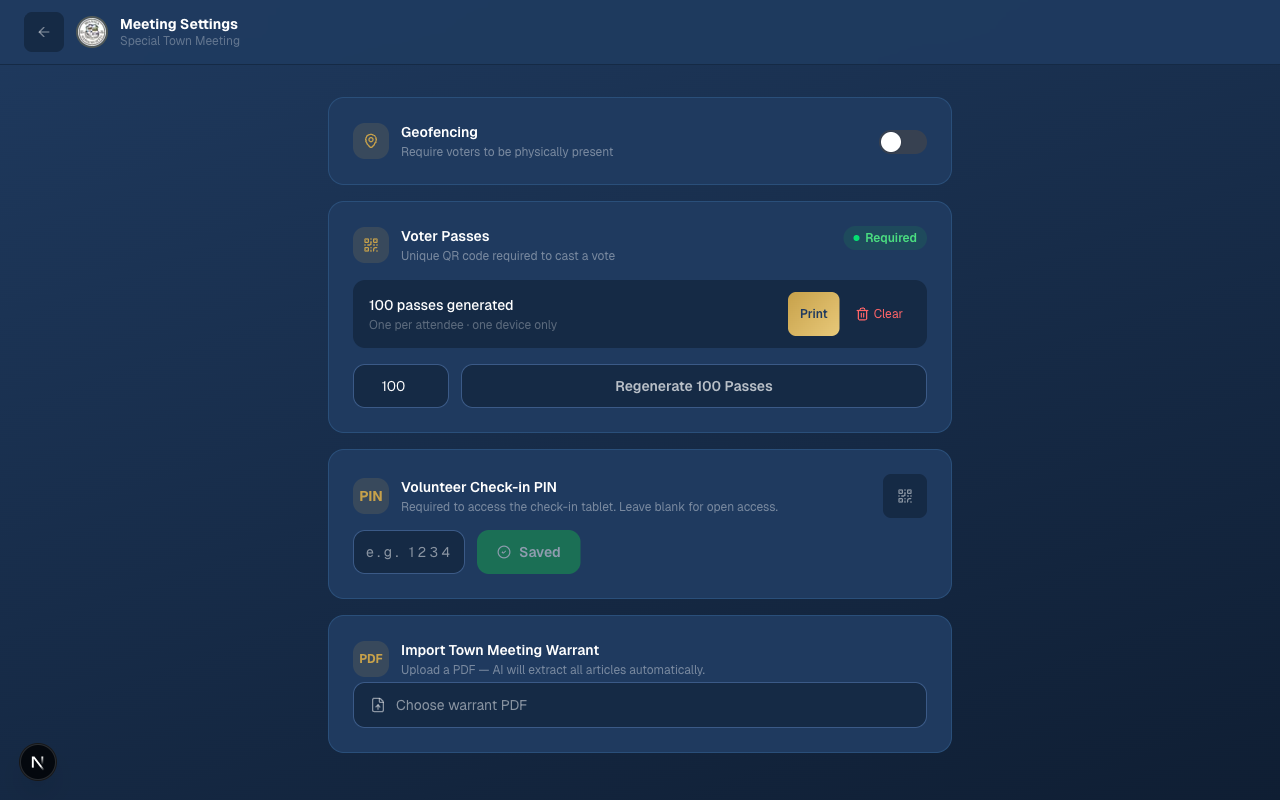
The moderator settings panel where voter passes are generated and meeting options are configured before the meeting begins.
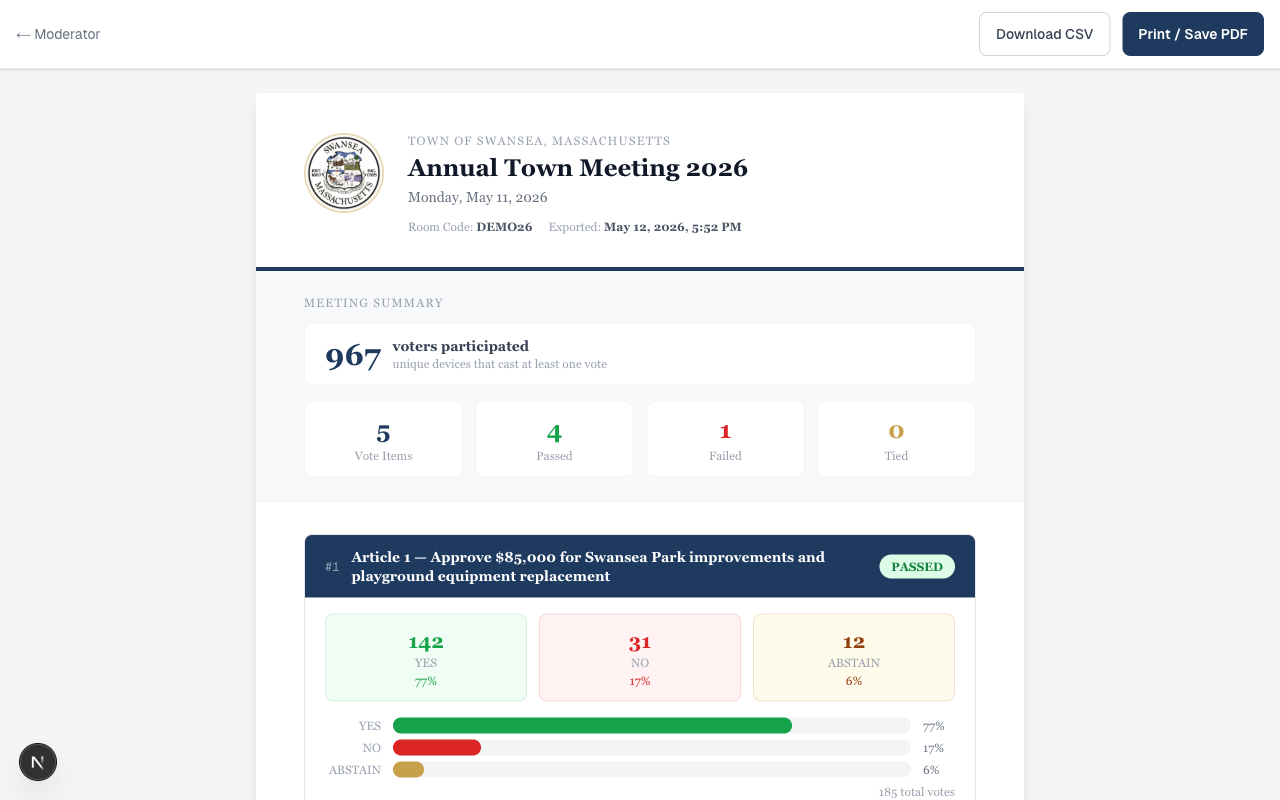
The Official Meeting Report generated automatically after the meeting — showing participation count, article outcomes, and percentage breakdown for each vote. Suitable for filing with the Town Clerk.
Meeting Night Workflow
Before the meeting (30 minutes of setup)
- The moderator logs into the system and creates the meeting — entering the date, title, and warrant articles
- Voter passes are generated and printed — one per expected attendee (typically 200–400 for Swansea)
- The moderator's device is set as the geofence anchor point for the auditorium
- The display screen is connected and the control panel is open on the moderator's tablet
At the door (check-in)
- Volunteers at the check-in table look up each voter by name and address as usual
- Instead of (or in addition to) signing the voter roll, they hand the voter a printed Voter Pass
- The voter scans the QR code at their seat — this takes under 10 seconds and can be done any time before voting starts
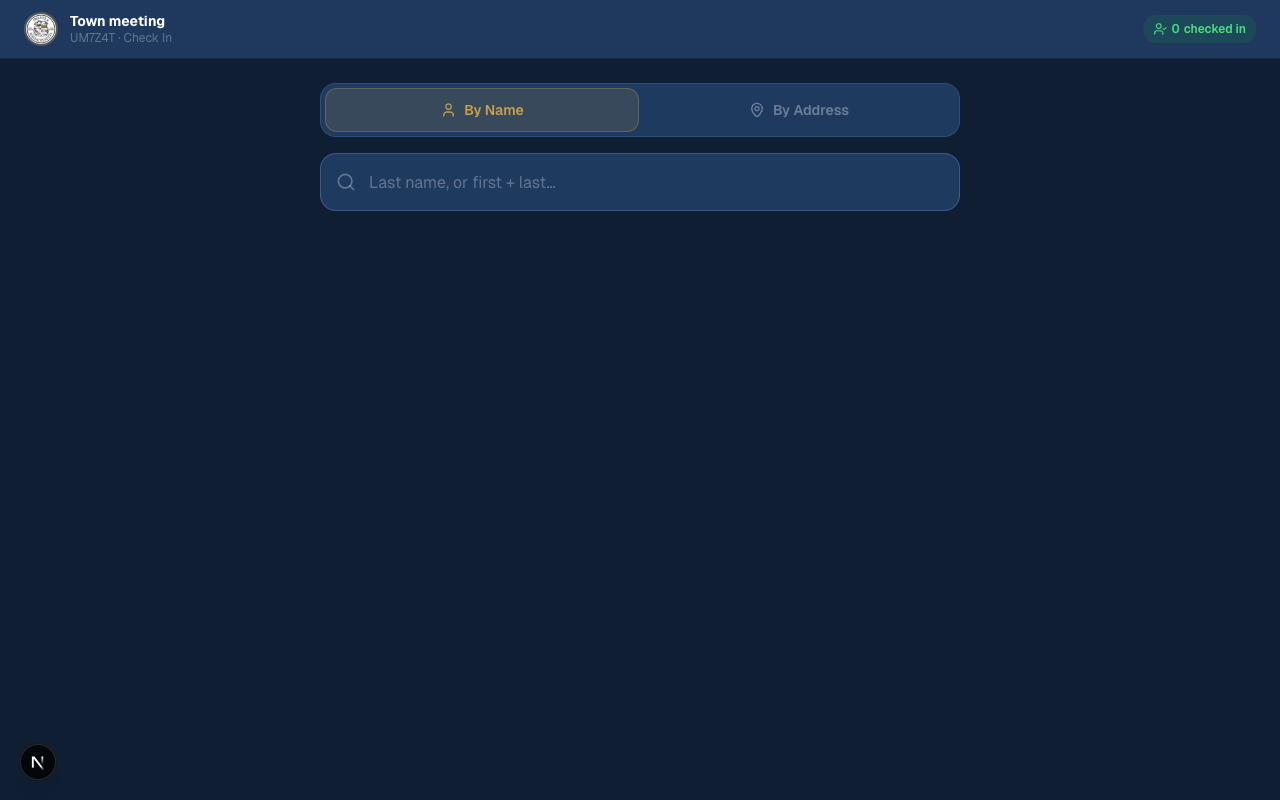
The volunteer check-in tablet lets staff look up voters by name or address. Once confirmed, the voter receives their printed pass.
During the meeting
- Voice votes proceed as normal — the electronic system sits idle for clear outcomes
- When the moderator calls for a ballot vote, they instead say: "We'll conduct this as an electronic vote — please take out your phones and open your voter pass"
- The moderator opens the vote on the control panel — a countdown or live tally appears on the projection screen
- Voters tap YES, NO, or ABSTAIN — the result is called within 90 seconds once voting closes
After the meeting
- The moderator closes the meeting in the system — all voter passes are automatically deactivated
- The Official Report is generated and can be printed or saved to PDF immediately
- A CSV export is available for the Town Clerk's records
- All data is stored in a database controlled entirely by the Town — no voter data leaves to a third party
Security & Vote Integrity
Every electronic vote requires two independent security checks to pass simultaneously. A voter who fails either check cannot cast a vote.
Voter Pass (QR Token)
Each printed pass contains a cryptographically signed token unique to one voter and one meeting. When a voter scans it, the server records which specific device claimed that token. A pass used on one phone cannot be used on another. A pass from a previous meeting cannot be used at tonight's meeting. A duplicate or photographed pass is detected and rejected instantly.
GPS Geofencing
When the moderator opens a vote, every voter's phone checks its GPS location against the auditorium's coordinates. The server uses the Haversine formula — the same math used in navigation apps — to calculate distance. Any device reporting a location outside the configured radius is blocked from submitting a vote, even if they have a valid pass.
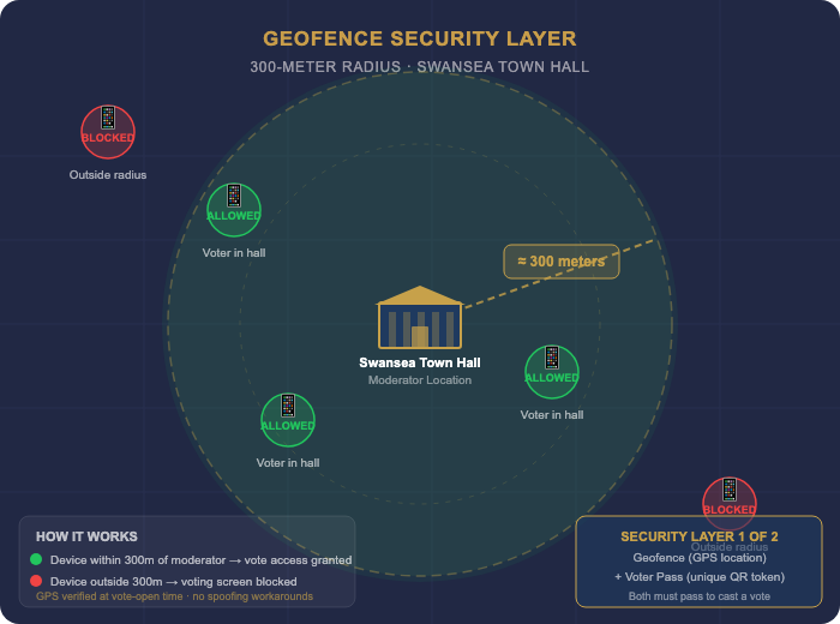
The geofence creates a physical boundary around the auditorium. Devices inside can vote; devices outside — including someone at home with a stolen voter pass — are blocked.
What this means for Swansea
- Absentee voting is impossible. A valid voter pass cannot be used from outside the auditorium — GPS blocks it at the server level
- One vote per voter. The server enforces one vote per pass and one pass per device — duplicate voting is mathematically prevented
- Full audit trail. Every vote is logged with a timestamp. The moderator report shows total unique voter count. Results cannot be altered after closing
- No internet voting. The system requires physical presence in the room — it is not an online voting system and cannot be used remotely
Comparison to Alternatives
Swansea has three realistic options for contested votes: the current paper ballot, a clicker-based hardware system, or this system. Here is how they compare on the dimensions that matter most.
| Factor | Paper Ballot | Clicker System (Option Technologies / Meridia) |
Swansea Meeting Vote |
|---|---|---|---|
| Time per contested vote | ✗ 15–20 minutes | ~ 3–5 minutes | ✓ 60–90 seconds |
| Hardware required | ~ Paper, pens, ballot boxes | ✗ 200–400 clicker devices, base stations, cables | ✓ None — voters use their own phones |
| Vendor technician required | ✓ No | ✗ Yes — vendor must be on-site | ✓ No — moderator runs it independently |
| Automatic audit trail | ✗ Manual recount only | ~ Partial, vendor-controlled | ✓ Full — timestamp, device, choice per vote |
| Data stays in town control | ✓ Yes | ✗ Vendor servers | ✓ Town-owned database |
| Works if phone is dead/absent | ✓ Yes | ✓ Yes | ~ Voter may abstain or use a paper backup at moderator's discretion |
| Duplicate vote prevention | ✗ None automatic | ✓ One clicker per voter | ✓ One pass per device, enforced server-side |
| Requires physical presence | ✓ Yes | ✓ Yes | ✓ Yes — GPS-enforced |
Cost & Value
The table below compares what Swansea would spend under each approach over three years, assuming two town meetings per year with an average of three contested ballot votes each.
| Cost Item | Paper Ballot | Clicker System | Swansea Meeting Vote |
|---|---|---|---|
| Setup / purchase | — | $7,300–$27,000 | Already built |
| Per-meeting cost | ~$150 (paper, printing) | $5,000–$20,000 rental + technician | Minimal (hosting ~$20/mo) |
| Staff time (ballot counting) | ~2 hours per meeting | Eliminated | Eliminated |
| 3-year total estimate | ~$900 direct + significant staff overhead | $30,000–$120,000+ | ~$700 (hosting only) |
The value of keeping people in the room
When contested votes take 90 seconds instead of 20 minutes, residents stay. More voters present for later articles means outcomes that better reflect the actual will of the town. This is the most important benefit and the hardest to put a dollar figure on.
Implementation & Timeline
The system is built and operational. No development work, no procurement process, and no vendor contract are required to pilot it at the next town meeting.
What Swansea needs to provide
- A laptop or tablet for the moderator's control panel (any modern device works)
- A projector connection for the display screen (already available in the auditorium)
- A printer to produce voter passes before the meeting (standard office printer)
- A volunteer at check-in familiar with the voter roll lookup — same role as today
Proposed rollout
- Week 1–2: Moderator and one select board member complete a 30-minute walkthrough of the system using the online training guide
- Week 3: Test run — a mock vote is conducted in the auditorium to confirm GPS accuracy and check-in flow
- Next town meeting: System is used live for contested ballot votes. Voice votes proceed exactly as always.
Training resources included
- Moderator Training Guide — step-by-step walkthrough of the entire system, with screenshots
- Security & Integrity Document — detailed explanation of how the two-layer security works, written for select board members and town counsel
- On-call support from Lands End Technology for the first two meetings
Common Questions
What if a voter doesn't have a smartphone?
The moderator can issue a paper ballot for that voter, exactly as today. The electronic system handles the majority of voters and the paper count for the remainder is small enough that the total time is still under five minutes. In practice, most residents attending town meeting carry a smartphone.
What if the auditorium has poor cell service?
The system requires Wi-Fi or cell data only to submit the vote — a brief internet connection of less than one second. Voter passes are pre-loaded on the phone when the QR code is scanned at the door, so limited connectivity during the vote itself is not a problem. The Town may also provide a simple Wi-Fi network in the auditorium as an option.
Does this change the legal structure of the open town meeting?
No. The moderator retains full authority over all procedural decisions, including when to call for a vote and whether to accept the result. The electronic system is a counting tool — it replaces paper ballots the same way a microphone replaces cupped hands. Massachusetts General Law does not prohibit electronic vote counting at open town meetings.
Who controls the data?
All meeting data, voter pass records, and vote results are stored in a database hosted on infrastructure controlled by Lands End Technology on behalf of the Town of Swansea. No data is shared with or retained by any third party. The Town may request a full export of all data at any time.
Can a voter change their vote after submitting?
No. Once a vote is submitted, it is locked. The moderator can reopen a vote if needed (for example, if a technical problem occurred) but individual votes cannot be changed by anyone, including the moderator.
What happens if someone tries to vote twice?
The system rejects the second attempt silently. The voter's pass is flagged after the first submission — any further attempts from any device are blocked at the server level before the vote is recorded.
What if the system goes down during a vote?
The moderator can close the electronic vote and call a paper ballot as a fallback. Because the system is used only when the moderator chooses, the town is never dependent on it — it is an improvement, not a single point of failure.